
After updating to PRTG 25.4.114, the PRTG core server does not start anymore, and the log contains the following message: Signature of \Program Files(x86)\PRTG Network Monitor\32 bit\PRTG Server.exe is not valid. What can I do to resolve the issue?
This article applies as of PRTG 25.4.114
New Root and Intermediate Certificates in PRTG
As of PRTG 25.4.114, a new trusted certificate authority signs the binary of PRTG. As a result, the code signing signature verifications fails on systems which don't have the following trusted root certificates in the Windows certificate store:
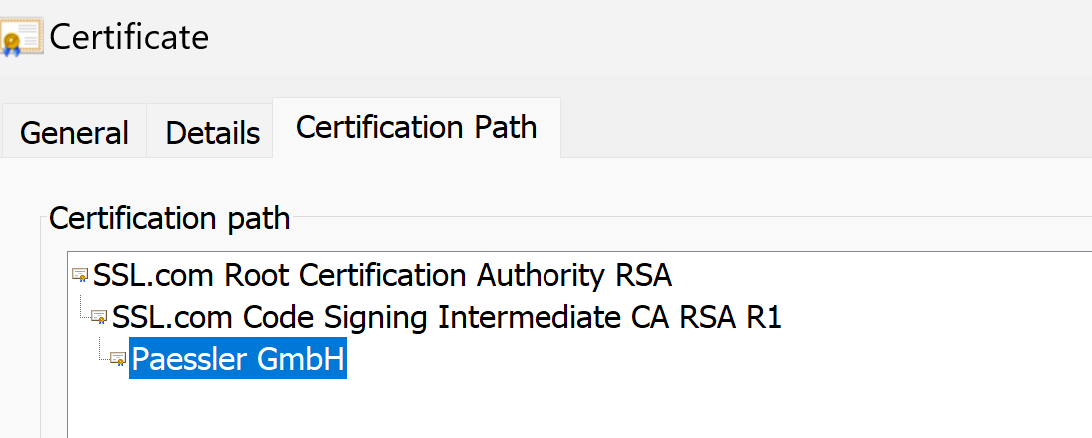
This causes the PRTG core server to not start in some cases. The respective error message in the log file is:
Signature of \Program Files(x86)\PRTG Network Monitor\32 bit\PRTG Server.exe is not valid
Solution
Add the new trusted certificates (root and intermediate). You can either use the Microsoft Root Certificate Program or download the Entrust certificates from the SSL.com repository.
Microsoft Root Certificate Program
To use the Microsoft Root Certificate Program to add the certificates, follow the instructions here: List of Trusted Root Certificates in Windows.
Download from the SSL.com repository:
Download the following certificates and import them to the Windows certificate store on the PRTG core server system and probe system:
