
After updating to PRTG 26.1.118, the PRTG core server does not start anymore, and the log contains the following message:
Signature of \Program Files(x86)\PRTG Network Monitor\64 bit\PRTG Server.exe is not valid
What can I do to resolve the issue?
This article applies as of PRTG 26.1.118
New Root and Intermediate Certificates in PRTG
As of PRTG 26.1.118, Paessler signs PRTG binaries with a new EV (extended validation) code signing certificate. This replaces the previous OV (organization validated) certificate. The change requires a new intermediate and root certificate authority (CA).
Systems that do not have the new certificates in the Windows certificate store cannot verify the signature of the PRTG binary.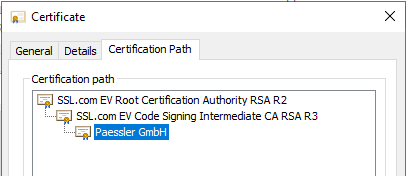
This causes the PRTG core server to not start in some cases. The respective error message in the log file is:
Signature of \Program Files(x86)\PRTG Network Monitor\64 bit\PRTG Server.exe is not valid
Affected versions
You are affected if you run one of the following versions and plan to update to PRTG 26.1.118:
- Stable: PRTG versions earlier than 26.1.116.1532
- Preview: PRTG versions earlier than 26.1.116.1534
Solution
The steps that you need to take depend on which PRTG version you are updating from.
If your current version is PRTG 26.1.116.1532 (Stable), PRTG 26.1.116.1534 (Preview), or later
Add the new trusted certificates (root and intermediate). You can either use the Microsoft Root Certificate Program or download the Entrust certificates from the SSL.com repository. See section Add new certificates below.
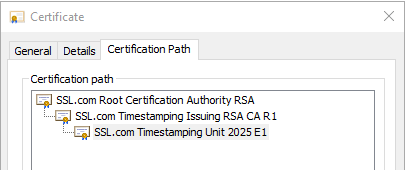
If you do not have the required timestamping certificate, you must add it as well:
Earlier versions
If you want to update from a version earlier than PRTG 26.1.116.1532 (Stable) or PRTG 26.1.116.1534 (Preview), you cannot update directly to PRTG 26.1.118. You must install intermediate versions in order and add the required certificates before each version that requires a new certificate.
Example for PRTG stable versions: If your current version is earlier than PRTG 25.4.112.1189, you must update in the following order:
- Update to PRTG 25.4.112.1189 (intermediate version for PRTG 26.1.114).
- Add the certificates required for PRTG 26.1.114, then update to PRTG 26.1.114.
- Update to PRTG 26.1.116.1532 (intermediate version for PRTG 26.1.118).
- Add the certificates required for PRTG 26.1.118, then update to PRTG 26.1.118.
For the history of all intermediate versions, see the PRTG Manual: Update from Previous Versions. This page contains the links to Knowledge Base articles with the corresponding certificate download links.
Add new certificates
You can add the new certificates automatically through the Microsoft Root Certificate Program, or manually from the SSL.com repository.
Microsoft Root Certificate Program
If your organization uses the Microsoft Root Certificate Program, Windows adds the required certificates automatically. To verify or to trigger this, we recommend that you follow the instructions here: List of Trusted Root Certificates in Windows.
Download from the SSL.com repository
If your organization manages the Windows certificate store manually and does not use the Microsoft Root Certificate Program, download and import the below certificates before you start the update to the intermediate version or versions. Import them to the Windows certificate store on the PRTG core server system and probe system:
- SSL.com root certificates
- SSL.com intermediate certificates
- SSL.com timestamping root certificates
- SSL.com timestamping intermediate certificates
The timestamping certificates are required if your Windows system does not automatically trust the SSL.com timestamping chain.
For future updates: Before each future PRTG update, we recommend that you check the PRTG Version History for code signing certificate changes and make sure to update certificates as needed.
