
This article applies as of PRTG 26.1.118
WMI Authentication Method: Negotiate
When PRTG uses Negotiate as the authentication method, Windows tries Kerberos first and falls back to NTLM if Kerberos authentication fails. To verify which protocol was used, check the Windows event log on the target system:
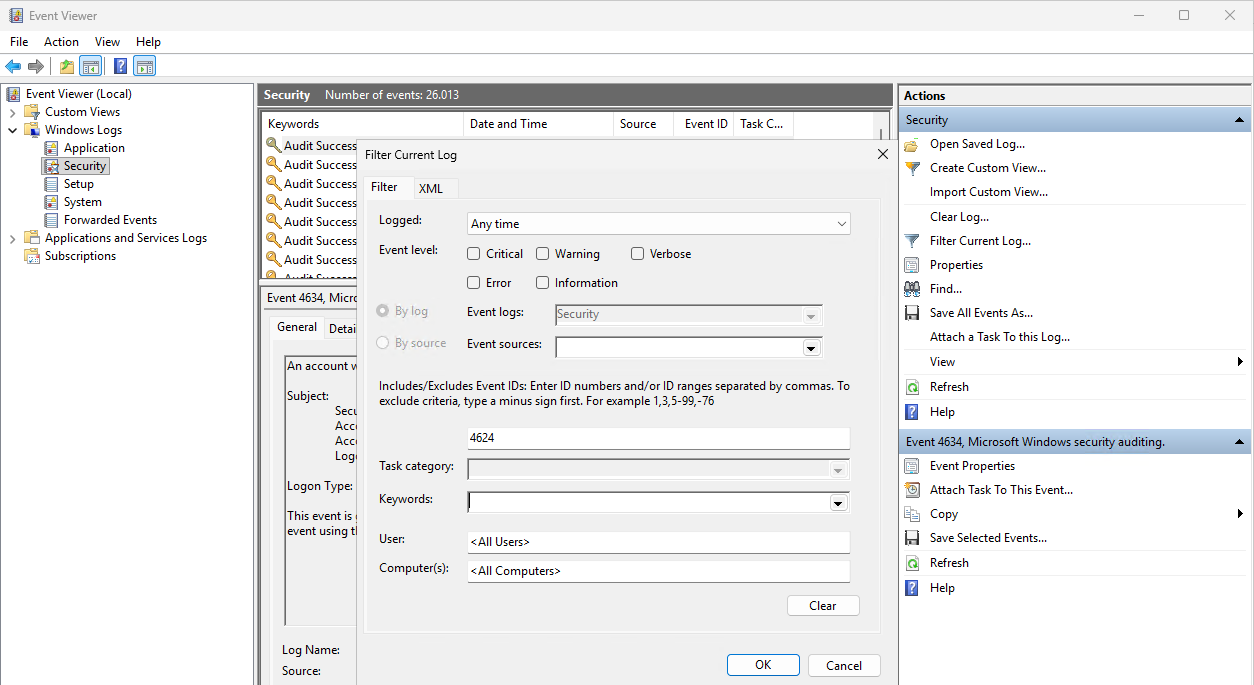
- Open Event Viewer by searching for it in the Windows search bar.
- Go to Windows Logs | Security.
- Filter the log by Event ID 4624.
- In Actions, select Filter Current Log.
- Enter 4624 in the event ID search box.
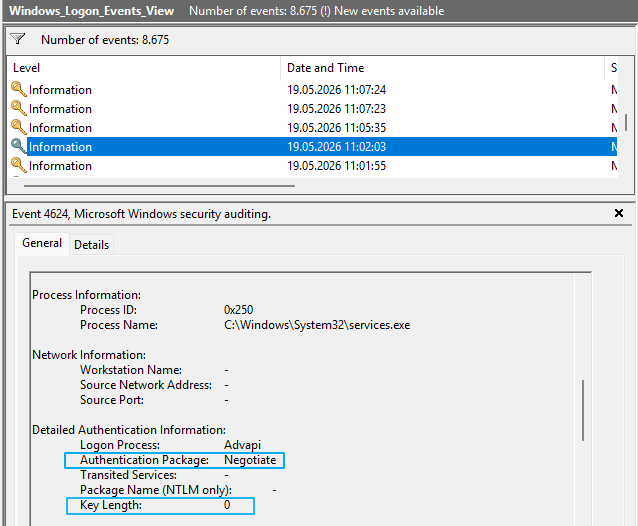
- In each event, check the Authentication Package field under Detailed Authentication Information. It shows the protocol that Windows used: Kerberos, NTLM, or Negotiate.
- If Authentication Package shows Negotiate, check the Key Length field. A value of 0 means Kerberos was used. Any other value means NTLM was used.
For more information on how Windows selects a protocol during negotiation, see the Microsoft documentation on authentication.
For more information on event 4624, see the Microsoft documentation: 4624(S): An account was successfully logged on.
