
This article applies as of PRTG 26
Increasing maximum connections for VMware sensors
In the sensor logs, I receive the error messages
The request has timed out because the sensor is waiting for mutex. To resolve this issue, change your vCenter settings to accept more connections at the same time. Also try to distribute your VMware sensors among several remote probes. For more information, see https://helpdesk.paessler.com/en/support/solutions/articles/76000063102. (code: PE121)
or
This sensor has not received data for x seconds. Consider distributing your VMware sensors across several probes!
If you experience connection failures in your VMware sensors, change your vCenter settings to accept more connections at the same time. If this is not enough, try to spread your sensors over several (remote) probes.
For best performance of VMware sensors, we strongly recommend that you use Windows Server 2012 R2 or later on the probe system with the VMware sensors. In our tests, Windows Server 2012 R2 or later showed a much better performance for VMware monitoring than other operating systems.
Install .NET updates
This section only applies to the VMware Datastore (REST) sensor.
A reliability and performance update for .NET Framework 4.0 is available as an optional update (see Reliability Update 2 for the .NET Framework 4).
After installing this update on the probe system, you can run
- up to 300 VMware sensors with a 60-second scanning interval if your PRTG core server (or remote probe) runs on Windows 2012 R2 or later, or
- 30 VMware sensors in a 60-second scanning interval if your PRTG core server (or remote probe) runs on Windows 2008 R2.
Change VMware settings
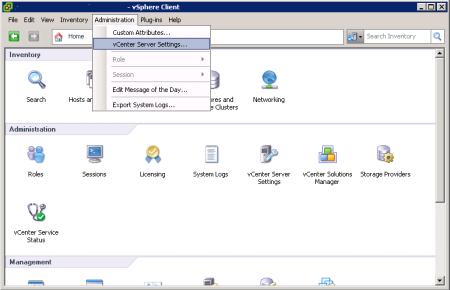
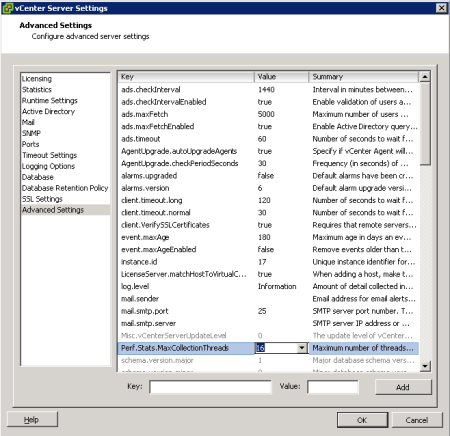
Open your vSphere Client settings console from the main menu, select Administration | vCenter Server Settings. In the Advanced Settings section, change the entry for the key
Perf.Stats.MaxCollectionThreads (see screenshots below).
The default value is 2. Change it to 16 to allow the maximum of possible synchronous connections.
Restart the vCenter Server services to activate the changes.
Spread sensors over several probes
The VMware system counts incoming connections per IP address or machine that the requests come from. Spreading your VMware sensors over several remote probes also helps to increase the connection limit.
The VMware Datastore (REST) sensor sends REST requests to the vSphere API endpoint. There are rate limits applied to these requests. One sensor sends multiple requests per scan. You might experience interruptions in monitoring if you have many VMware Datastore (REST) sensors.
Cluster setups
If you are running a cluster setup, remote probes cannot be clustered, and therefore all sensors that run on remote probes are not fail-safely monitored. In a cluster setup, we therefore recommend that you add your most important VMware sensors to the cluster probe (for fail-safe monitoring), the others to one or more remote probes.
If you run VMware sensors on the cluster probe, each cluster node creates its own connection to the VMware server(s) to query monitoring data. To minimize load, we strongly recommend that you use a scanning interval of five minutes or more.
