I can suddenly no longer access PRTG's web-interface from remote hosts (local network, internet) using it's IP or DNS name anymore.
I can however access it locally on the PRTG server and monitoring is also still working.
What's the issue and how can it be fixed?
Article Comments
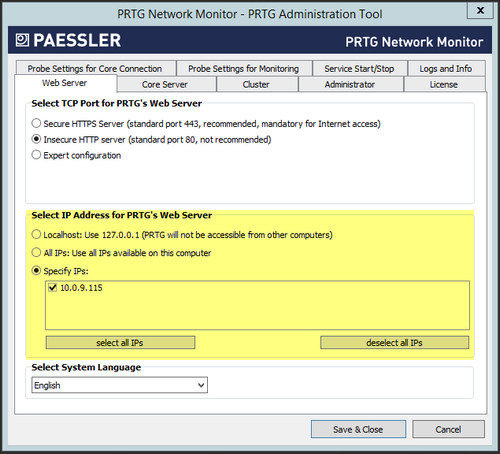
In some situations (IP Address change/update, NIC Driver Uptime, Virtual machine Integration Services, NIC addition, et cetera) PRTG may revert it's web-server address binding configuration.
In such cases, please proceed with the following:
- Open the PRTG Administration Tool on the PRTG Core Server.
- Head to the Web Server tab.
- Select the proper IP Address(es) for PRTG's Web Server. (It will likely be set to Localhost)
- Save and Close (Will restart PRTG with the new settings).
- PRTG should be reachable once again.
It's worth also checking the Probe Settings for Monitoring and Core Server tabs as they also hold settings for address bindings.
Jul, 2015 - Permalink


In some situations (IP Address change/update, NIC Driver Uptime, Virtual machine Integration Services, NIC addition, et cetera) PRTG may revert it's web-server address binding configuration.
In such cases, please proceed with the following:
It's worth also checking the Probe Settings for Monitoring and Core Server tabs as they also hold settings for address bindings.
Jul, 2015 - Permalink