Bandwith of specific ports in map
Modified on 2025-06-10 13:04:20 +0200
Attention: This article is a record of a conversation with the Paessler support team. The information in this conversation is not updated to preserve the historical record. As a result, some of the information or recommendations in this conversation might be out of date.
Important: We no longer maintain this article. The information might be out of date.
i tried to integrate the port bandwith of specific ports into the map but i cannot find any option for this.
Can anybody help me with this?
Article Comments
Hello,
Once you've created all the Bandwidth Sensors, head to the Map Designer:
Place the objects that represent the devices that are connected to the switch on the map, you can then use the connectors to represent the connections on the map and the last step would be placing the objects for every Bandwidth Sensor you want on the map and applying any of the possible graphs to the map-object:
- Graph (Large Fonts)
- Graph (Small Fonts)
- Graph (Tiny Fonts)
- Graph (No Labels)
The resulting Map would look a bit like this:
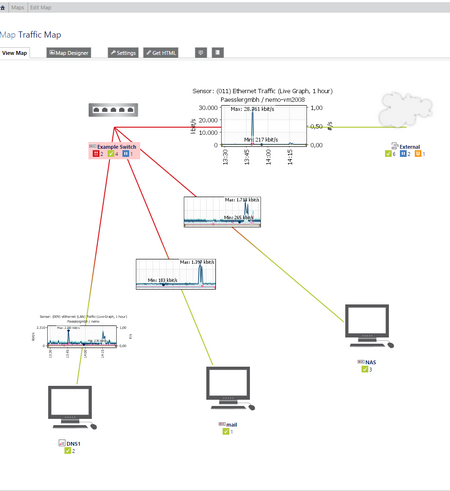 Click here for Full-screen Image
Best Regards,
Jul, 2015 - Permalink
Disclaimer:
The information in the Paessler Knowledge Base comes without warranty of any kind. Use at your own risk. Before applying any instructions please exercise proper system administrator housekeeping. You must make sure that a proper backup of all your data is available.


Hello,
Once you've created all the Bandwidth Sensors, head to the Map Designer:
Place the objects that represent the devices that are connected to the switch on the map, you can then use the connectors to represent the connections on the map and the last step would be placing the objects for every Bandwidth Sensor you want on the map and applying any of the possible graphs to the map-object:
The resulting Map would look a bit like this:
Best Regards,
Jul, 2015 - Permalink