Where can I find the Rescan Tab for devices
Modified on 2025-06-10 14:08:21 +0200
Attention: This article is a record of a conversation with the Paessler support team. The information in this conversation is not updated to preserve the historical record. As a result, some of the information or recommendations in this conversation might be out of date.
Important: We no longer maintain this article. The information might be out of date.
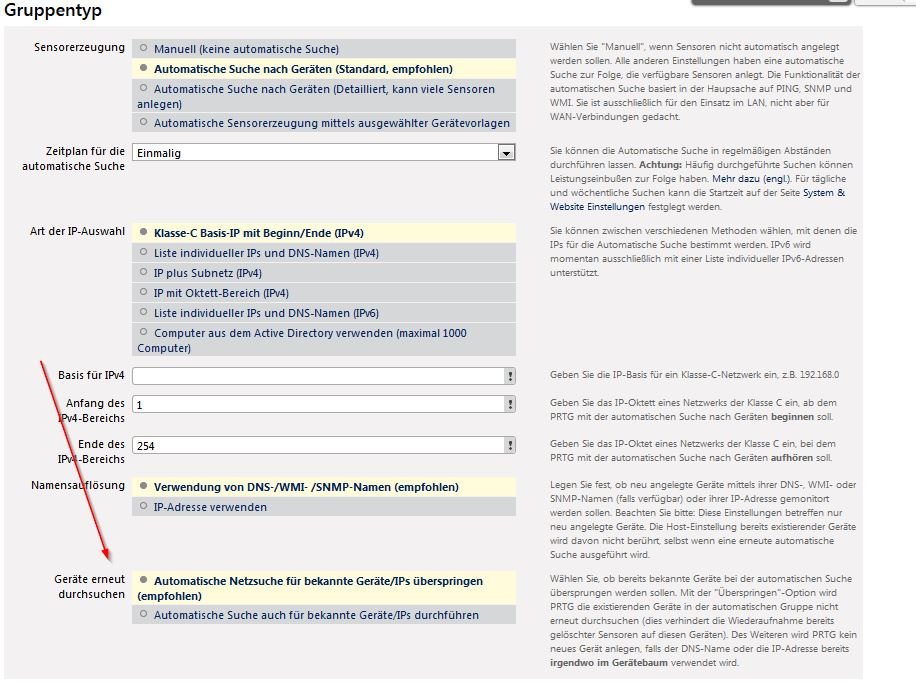
I have a German Version. Where do I find the Rescan Device Tab so that I can skip auto-discovery for known devices.
Thank you in Advance
Article Comments
When you are setting the options for the group Auto-Discovery there should be an option "Geräte erneut durchsuchen" Setting this to " Automatische Netzsuche für bekannte Geräte/IPs überspringen (empfohlen) " will stop PRTG from auto-discovering devices that already exist in the device tree.
Sep, 2013 - Permalink
Disclaimer:
The information in the Paessler Knowledge Base comes without warranty of any kind. Use at your own risk. Before applying any instructions please exercise proper system administrator housekeeping. You must make sure that a proper backup of all your data is available.


When you are setting the options for the group Auto-Discovery there should be an option "Geräte erneut durchsuchen" Setting this to " Automatische Netzsuche für bekannte Geräte/IPs überspringen (empfohlen) " will stop PRTG from auto-discovering devices that already exist in the device tree.
Sep, 2013 - Permalink